


Prompt, AGENTS.md, skill, or MCP server?#
There are a variety of ways to give a coding agent new information or abilities, but it can be confusing when to use each one. Generally, with coding agents like Claude Code or Posit Assistant, you can:
- Write prompts in the chat (i.e., normal usage).
- Add information to either a project-level or user-level
CLAUDE.mdorAGENTS.md. The contents of a directory’sCLAUDE.mdorAGENTS.mdare included in the agent’s system prompt in every session in that directory. You can also create user-level versions that apply to every session. - Write a skill or use an existing one. Skills are packaged instructions that can include both text and code. The agent loads a skill only when it’s relevant.
- Add an MCP server. An MCP (Model Context Protocol) server provides an agent with access to otherwise hard-to-find context, mostly through tools, using a standardized interface.
This list is roughly ordered from most straightforward to most complicated.1
So when do you use one over the other? There are two axes that might matter for your decision.
The first axis is reusability: do you want the agent to perform the task or access the information just once, or many times? The more often you or others will reuse something, the more it’s worth encoding somewhere more permanent.
The second axis is reach. Prompting, CLAUDE.md/AGENTS.md files, and skills all provide guidance on how to best make use of the existing context and tools. MCP servers can provide the agent with entirely new tools (in the agent tools sense), granting the agent access to hard-to-reach information.
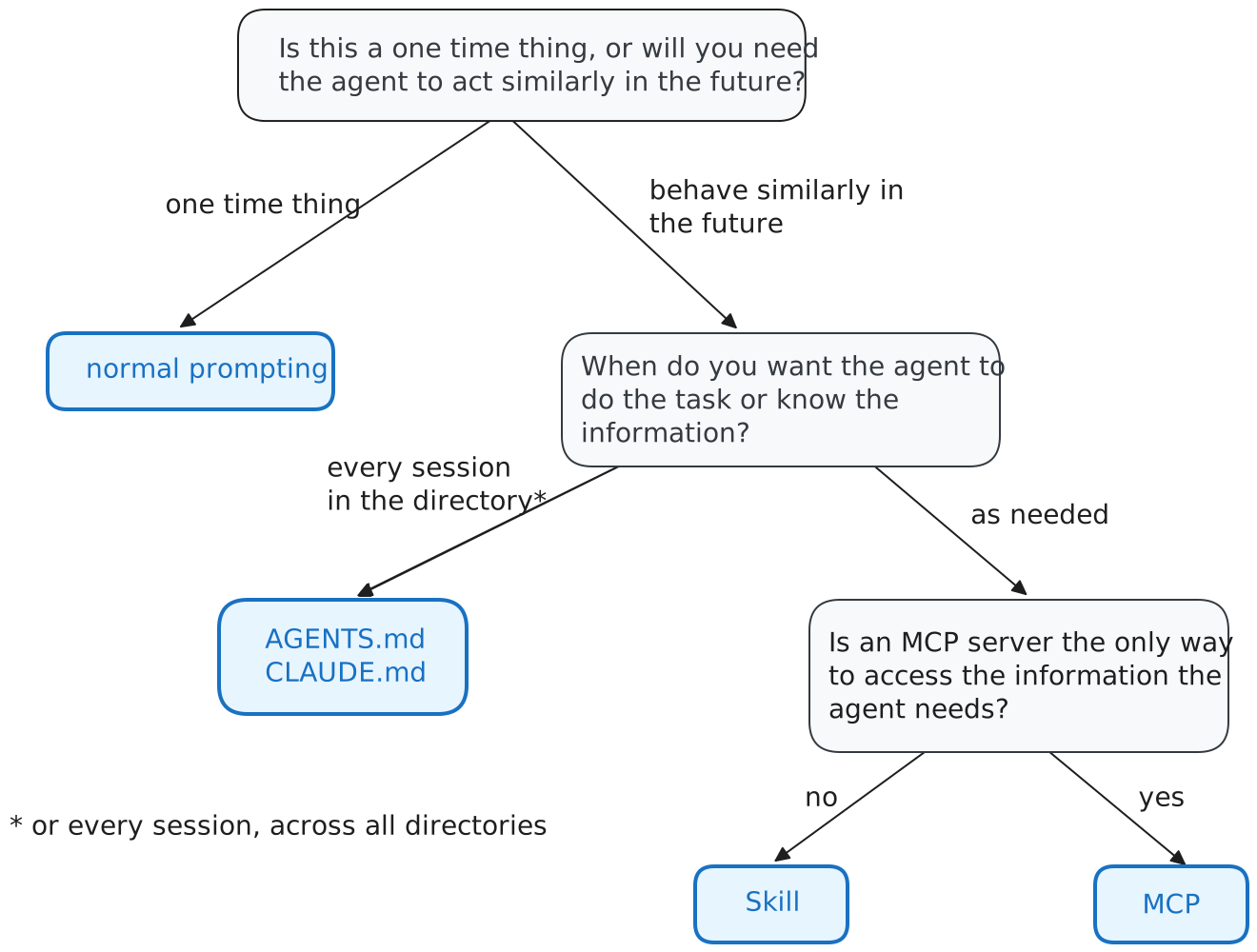
MCP servers often seem like the solution when you need to grant an agent access to an outside system, but they aren’t always necessary. In many cases, what seems like a task for an MCP server can actually be solved by a command-line interface (CLI) tool, or a CLI plus a skill that tells the agent how to use it. For example, GitHub has an MCP server, but the gh CLI does roughly the same thing.
The GitHub MCP server works by providing the agent with new tools, whereas the gh CLI takes advantage of the agent’s existing bash tool that lets it run arbitrary shell commands. The skill plus CLI option is therefore generally preferable from a simplicity standpoint, but also from a token standpoint: adding the GitHub MCP server would inject tens of thousands of tokens of tool definitions into every request, whereas a skill that tells the agent to use gh costs almost nothing and loads only when it’s relevant.
However, some information sources are hard to reach via the command line, because no CLI exists, the one that does isn’t fully featured, or it’s difficult for the agent to use. In some of these cases, the same sources can be accessed more effectively via MCP servers, such as design tools like Figma, knowledge repositories like Notion or Confluence, or issue trackers like Linear or Jira.
Posit news#
Posit Assistant in Positron#
As of the June release of Positron, Posit Assistant is now the default experience in Positron. Positron Assistant will be deprecated starting in the 2026.07 release (release date July 6).
We understand that the names are confusing! Our hope is that the transition state will be over soon and the confusion will lessen. If you want to understand why we gave different assistants very similar names, read this blog post from Posit CTO Joe Cheng: A brief and biased history of Posit data science agents.
Posit Assistant works with the same providers as Positron Assistant. If you have a working provider setup with Positron Assistant, you’ll be able to use that same setup with Posit Assistant. You can read more about available providers here.
Package updates#
- raghilda v0.2, a Python package for Retrieval Augmented Generation, is now on PyPI. This release, among other things, broadens support for crawling sites.
- debrief, an R package for LLM-friendly profiling, is now on CRAN. debrief turns profvis profiling output into text-based summaries, allowing AI agents to optimize R code more effectively.
-
One interface we didn’t mention here is ‘custom agents,’ a concept popularized by GitHub Copilot and now appearing under various names. These bundle some combination of prompts and tools (sometimes gathered via MCP). We’d reach for the options mentioned above first, which are open standards that are broadly supported across most agent platforms and thus can be shared and migrated more easily. ↩︎